The Equipment Service Management suite includes a number of modules, each offering its own specialized functionality. As useful as these modules are individually, their true power is unlocked when they are used together!
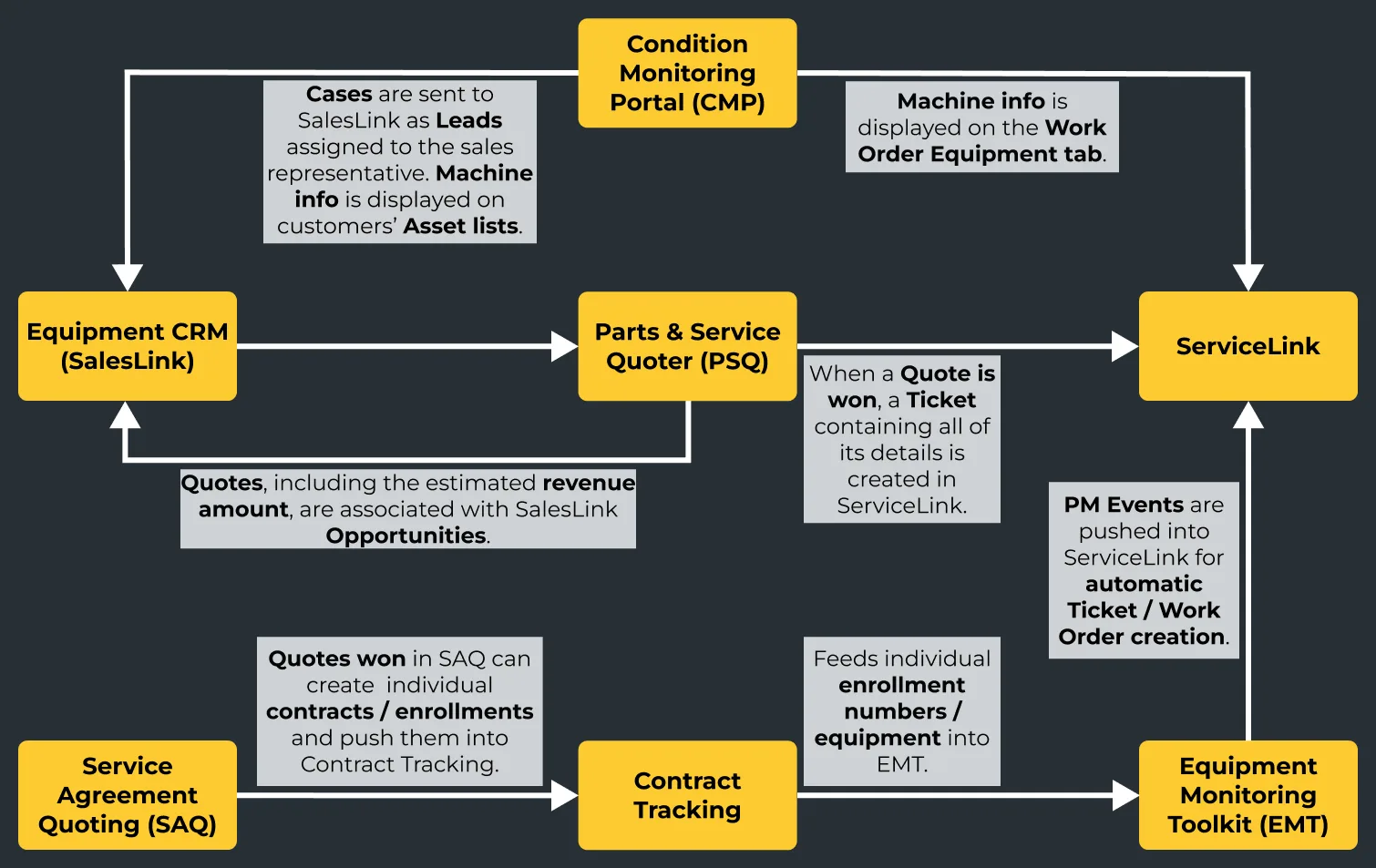
Service often starts with sales, making Equipment CRM an honorary member of the service suite. Leads can originate from a number of inputs, including Activities and Cases in CMP. Leads become Opportunities, which in turn become Quotes in PSQ. Won Quotes can then be pushed into ServiceLink for easy Work Order creation.
Click here to view our Equipment CRM onboarding program!
Valuable machine information viewed and managed in CMP – such as electronic alerts, scheduled oil samples, Service Letters and Inspections – can be used to create Leads in SalesLink. This information (configurations, warranties, Work Orders, Quotes, and Invoices) is also viewable in ServiceLink.
PSQ Quotes are tied to, and can be initiated from, Opportunities in SalesLink. Revenue amounts captured in PSQ are visible from the SalesLink Opportunity. When a Quote is won, a Ticket containing all of its details is created in ServiceLink – no additional data entry needed.
With SAQ, you can quote multiple units within a single Quote – and once a Quote is won, you can create Contracts for each unit with the click of a button. Packages created in SAQ can be used in iQuote to efficiently bundle CVAs.
Contract Tracking provides businesses with a comprehensive system to manage Customer Value Agreements (CVAs) by offering detailed Contract performance views, financial data visibility, and trend analysis. Gain valuable insights into Contract profitability and enhance your customer relationship management by ensuring reliability of service.
EMT provides a comprehensive view of equipment health and service needs. Use it to manage ownership changes, SMU Exceptions, and machine Exceptions that impact PM Events. PM Events scheduled in EMT are pushed to ServiceLink as Tickets, allowing service coordinators to effectively manage and schedule service work.
Manage Work Orders at a glance by Division, Branch, Cost Center, and Job Control. Take advantage of powerful dashboards to schedule technicians, review KPIs, manage warranty Work Orders, and view essential Work Order information.