Rental Management (Classic) offers several reports that can provide insights into your daily counter operations. The list below is just a sample of the reports that can be generated with the click of a button:
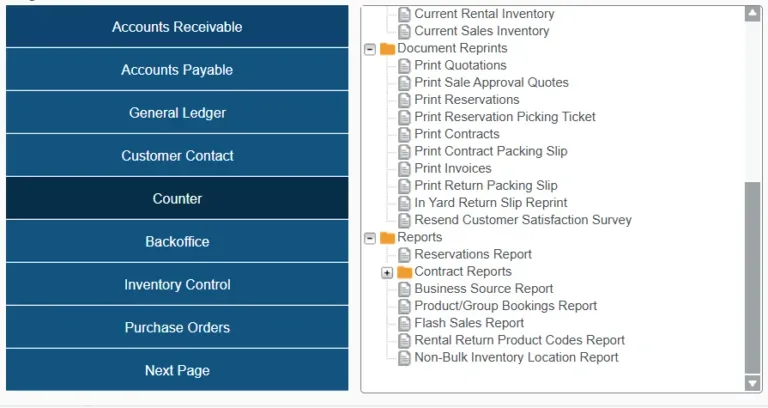
Contract Report: Generates a detailed breakdown of all rental Contracts created within a given time frame. Customize your report with over a dozen sorting and filtering options.
Reservations Report: Report on Reservations made within a given time frame. Filter by product, division, and salesperson.
Product/Group Bookings Report: An inventory-focused report that allows you to view availability for selected Products and Groups.
Non-Bulk Inventory Location Report:View the locations of non-bulk (i.e. unique) inventory assets, including whether each asset is currently out on Contract.
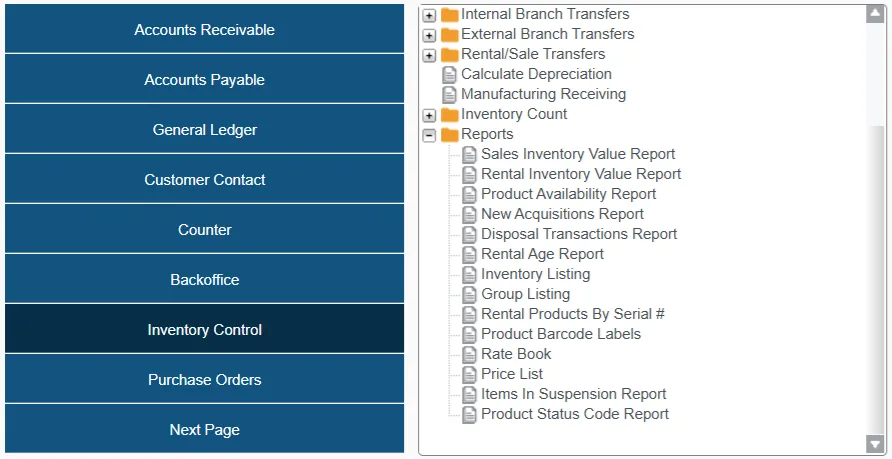
Inventory Control reports can provide detailed insights into inventory levels, movement, and utilization. These reports are essential for managing stock efficiently, reducing waste, optimizing usage, and ensuring equipment availability.
Rental/ Sales Inventory Value Reports: These reports provide you with the current value of your rental and sales inventories, organized by Product Class.
Product Availability Report: View the current availability of your rental Products, including number on hand, on rent, and other (e.g. undergoing maintenance).
Rate Book: Generate a rate book for your rental inventory, using the daily, weekly, and monthly rates established in Service, Rental, and Financials.
Rental Management (Classic) offers even a larger suite of inventory reports designed to provide detailed insights into various aspects of your operations. These reports facilitate informed decision-making and efficient management of assets. Below is an alphabetical list of additional reports available within the system:
Average Cost Changes Report: Monitors fluctuations in the average cost of inventory items over time.
Book Value Report: Provides the current book value of rental products, essential for financial reporting and asset valuation.
Date Counted Report By Location: Records the dates on which inventory counts were conducted at each location.
Equipment Summary Report: Offers a consolidated overview of equipment status, including availability and condition.
Inventory Adjustment Report: Details adjustments made to inventory quantities, aiding in tracking discrepancies.
Inventory Report with License / Serial #: Lists inventory items along with their associated license or serial numbers for precise tracking.
Inventory Transaction History: Chronicles all transactions affecting inventory levels, such as sales, rentals, and returns.
Inventory Usage Report: Analyzes the consumption patterns of inventory items over a specified period.
License Plate Expiry Report: Identifies equipment with upcoming license plate expirations to ensure timely renewals.
Negative Inventory Report: Highlights instances where inventory levels have fallen below zero, indicating potential issues.
Owning Location Discrepancy Report: Detects inconsistencies between recorded and actual equipment locations.
Product Quantity Report by Group: Summarizes inventory quantities categorized by product groups.
Product Substitution Report: Tracks instances where substitute products were provided in place of the original items.
Slow Moving Inventory: Identifies inventory items with low turnover rates, indicating potential overstock or obsolescence.