DOCUMENT DESIGNER

Tailor Your Templates

Built into Parts & Service Quoting (PSQ), Document Designer enables your team to create, edit, and manage their own quote, service ticket, and contract templates, in hours instead of weeks.

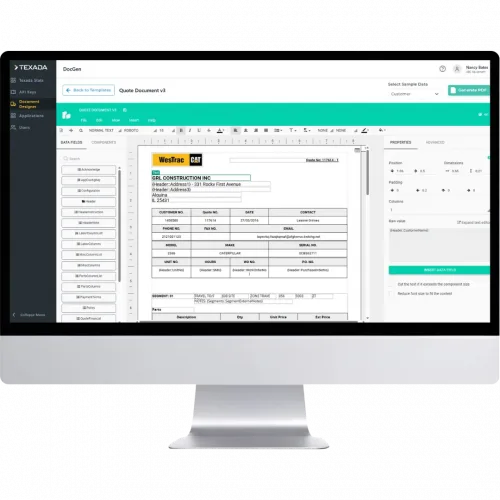
Monitor displaying a document designer app with a sample quote form titled WesTrac CAT and a form editor interface on screen.

UPDATE TEMPLATES

in hours, not weeks.

NO LIMITS

on line items or pages.

5 TEMPLATES

included at no extra cost.

Quote Template Software Built Into Your Workflow

Legacy print tools were built to output documents.

Document Designer is built for dealers who need to change them.

Give your admins full control over the templates behind every quote, service ticket, and contract. Give your reps the updated version the moment it’s saved, right inside PSQ.
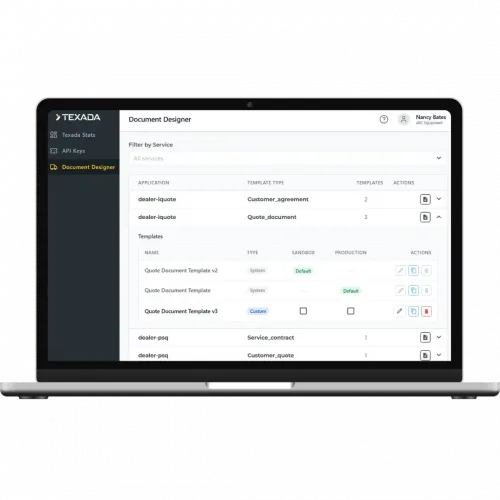

Laptop showing the Texada Document Designer dashboard with a left navigation pane and a list of templates in the main panel

Brands That Trust Texada

WHY DOCUMENT DESIGNER

Update Templates Without a Support Ticket

Change terms, logos, and layouts in-house, so a simple edit takes hours instead of weeks.

Screenshot of Texada DocGen document designer UI showing a form-like quote/template on screen with teal header and left sidebar navigation.
Male mechanic in a blue cap and orange gloves repairing a large blue industrial machine in a workshop.

Give Every Division Its Own Template

Build separate templates for each business unit, so Construction, Power Systems, and Earthmoving each get their own branding and terms. No more crowded multi-logo pages.

Quote at Any Size, Natively in PSQ

The old 2,855 line-item cap is gone. Even the largest machine and powertrain rebuild quotes stay in Texada, with no exports to outside tools.

Woman in gray scrubs wearing a headset, typing on a laptop while reviewing printed documents at a desk.

BUILT FOR YOUR BUSINESS

Built for the Admin

Document Designer gives your admins an embedded editor to design, update, and manage templates on their own schedule.

For Your Admins

Design and update quote, service ticket, and contract templates in-house, with no Texada ticket.

Only authorized admins can change base templates, so terms and branding stay locked down.

Build and deploy your own templates from go-live instead of waiting in a support queue.

Built for the Rep

Your reps don’t need to learn a template editor. They need the right template, every time.

For Your PSRs and PSSRs

New and updated templates appear in PSQ dropdowns the moment an admin saves them.

Build multi-thousand line rebuild quotes without exporting to outside tools.

Generate a clean PDF that opens in any browser or viewer and goes to the customer as-is.

Built for Leadership

One dealership. Many divisions.
No more compromises.

For Your Division Leaders

Give each business unit its own layouts, terms, and warranties.

Every quote carries approved legal language and brand standards, with no manual workarounds.

Divisional flexibility, with all quoting still centralized in Texada.

The Texada Difference

Built Into PSQ

Document Designer lives inside the quoting workflow your reps already use.

One Tool, Not Many

A single native platform keeps your tech stack clean and replaces the workarounds.

Expert Help When You Want It

Texada can build, migrate, or customize complex templates through set service packages.

Ready to take control of your templates?

Document Designer FAQs

What is Document Designer?

Document Designer is quote template software built into Texada’s Parts & Service Quoting (PSQ) application for Cat dealers. Admins create, edit, and manage quote, service ticket, and contract templates in-house, and reps generate PDFs from those approved templates without leaving PSQ.

Only authorized dealership admins. Access is role-based: admins have full design authority, while PSRs and PSSRs pick from pre-approved templates in their PSQ dropdown. Reps never need to learn the editor.

Yes. Legacy print tools capped quotes at 2,855 line items. Document Designer removes line-item and page limits, so even the largest machine and powertrain rebuild quotes stay in PSQ instead of moving to PandaDoc or Word.

In hours. Admins make the change themselves, and the updated template is available in PSQ dropdowns as soon as it’s saved. No support ticket, no waiting weeks.

PDF output protects your pricing, terms, and branding from unauthorized edits after a quote leaves PSQ. It also opens in any browser or file viewer, so reps can send quotes to customers as-is.

Every dealership gets five templates at no extra cost. The allowance is shared across all Texada applications that use Document Designer, not counted per app. Additional template packs are available; your Strategic Account Manager can share details

No. Document Designer is enabled in your sandbox first for testing, and your current quoting tools stay available during a transition period.

Yes. Texada Technical Services can build, migrate, or customize complex templates through set service packages. Your Strategic Account Manager can scope the work with you.